EMQX Edge 1.1.0 Released: Windows Support, Revamped HTTP Framework, and Enhanced Logging

EMQX Edge is the enterprise edition of the open-source NanoMQ project, designed specifically for edge computing environments in IoT deployments. As a lightweight, high-performance MQTT broker, EMQX Edge serves as a data aggregation hub at the edge, seamlessly bridging local IoT devices with cloud-based MQTT brokers such as EMQX Enterprise, AWS IoT Core, and other cloud IoT platforms.
Built on the foundation of NanoMQ's proven architecture and enhanced with enterprise-grade features, EMQX Edge provides a robust, scalable solution for organizations requiring reliable edge-to-cloud data synchronization. The product's core strength lies in its advanced MQTT bridging capabilities, supporting TCP protocol to ensure optimal performance across diverse network conditions.
We are excited to announce the release of EMQX Edge 1.1.0, bringing powerful new features, enhanced performance, and improved stability to meet the evolving needs of industrial IoT deployments. This update introduces Windows system support, a revamped HTTP framework, advanced logging capabilities, enhanced security features, and numerous stability improvements.
Key Features in EMQX Edge 1.1.0
Windows System Support
To address the widespread use of Windows in industrial environments, EMQX Edge 1.1.0 introduces full support for Windows systems. The Windows version maintains complete consistency with the Linux version in terms of startup, configuration, and management. However, the following differences apply:
- ZMQ transport protocol is not supported.
- QUIC transport protocol is not available for bridge configurations.
All core functionalities and user experiences remain identical across both platforms.
Optimized HTTP Framework
The HTTP server in EMQX Edge has been completely redesigned to deliver significant performance improvements. The new framework enhances concurrency handling, reduces blocking issues between REST API calls, and provides a smoother and more responsive user experience.
Enhanced Log Management
EMQX Edge 1.1.0 introduces a robust log management interface accessible via the Dashboard. Users can now:
- View logs for any time period with flexible navigation.
- Download complete log files for offline analysis and archiving.
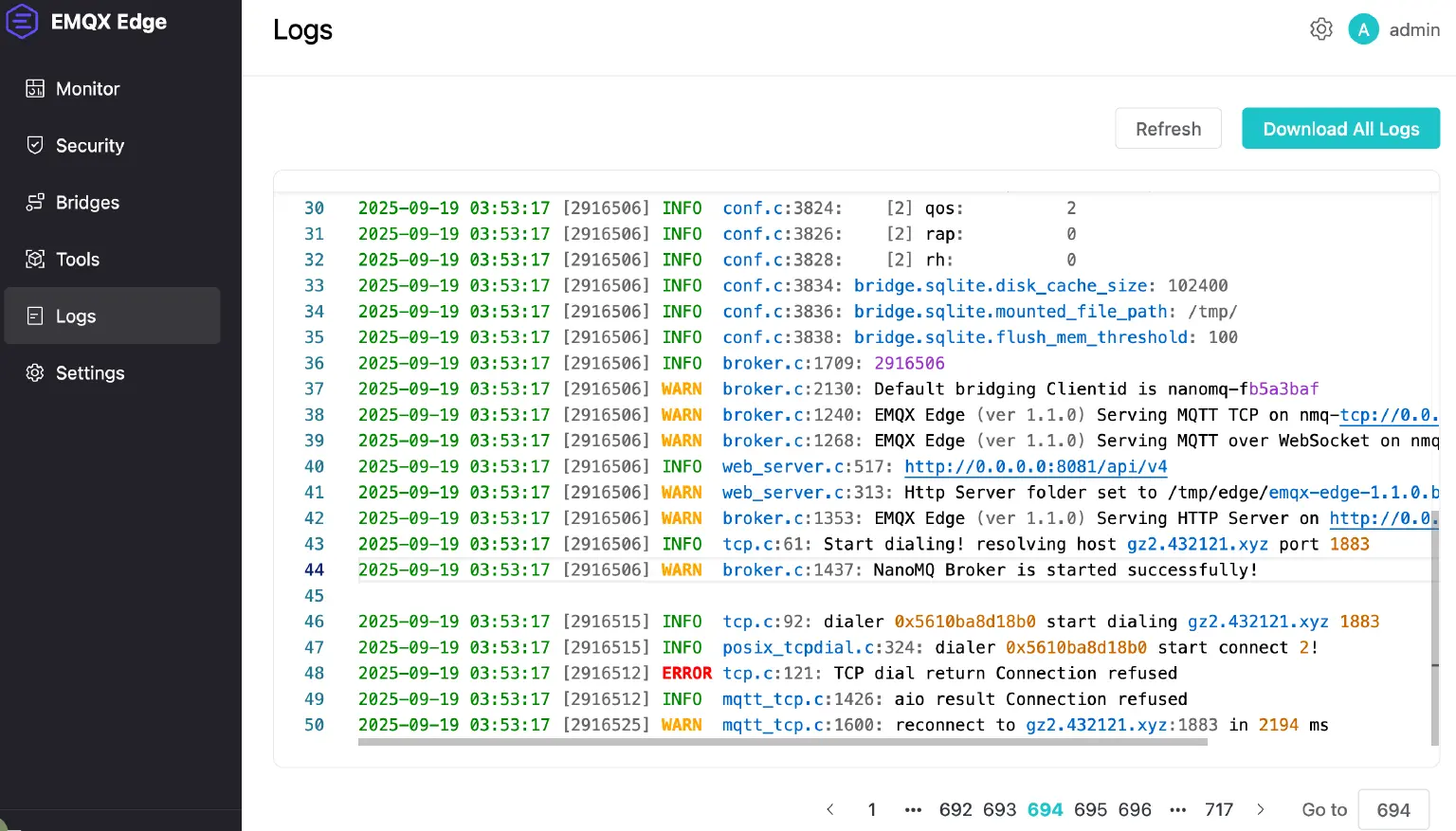
Viewing Recent Logs
Users can interact with logs in the following ways:
- Browse recent logs using pagination controls.
- Jump to a specific page by entering the page number.
- Refresh the current page with real-time updates using the refresh button.
Downloading Logs
A "Download All Logs" button is available in the top-right corner of the log interface, enabling users to retrieve complete log files for further analysis or record-keeping.
Enhanced Security with Encrypted Bridge Passwords
To bolster data transmission security, EMQX Edge now supports encrypted passwords in bridge configurations, replacing plaintext passwords to mitigate the risk of sensitive information exposure.
Generating Encrypted Bridge Passwords
EMQX Edge provides a dedicated REST API to generate encrypted bridge passwords. For example, to encrypt the plaintext password "public":
curl -i --basic -u admin:public -X POST "http://localhost:8081/api/v4/tools/aes_enc" -d '{"data":"public"}'
This returns the encrypted password, e.g.:
XthBefJxR/AybhpEC3/fwwAAAAAAAAAAAAAAAAAAAAAfPPcY9MQ=
Configuring Encrypted Passwords in Configuration Files
To enable encrypted passwords, set password_encrypted = true in the configuration file and use the encrypted password. Example:
bridges.mqtt.emqx1 {
    enable = true
    server = "mqtt-tcp://broker.emqx.io:1883"
    username = username
    password = "XthBefJxR/AybhpEC3/fwwAAAAAAAAAAAAAAAAAAAAAfPPcY9MQ="
    password_encrypted = true
}
Configuring Encrypted Passwords via REST API
When configuring bridges via REST API, set password_encrypted to true and provide the encrypted password. Example:
curl -i --basic -u admin:public -X PUT 'http://localhost:8081/api/v4/bridges/emqx1' -d '{
    "emqx1": {
        "name": "emqx1",
        "enable": true,
        "server": "mqtt-tcp://broker.emqx.io:1883",
        "username": "username",
        "password": "XthBefJxR/AybhpEC3/fwwAAAAAAAAAAAAAAAAAAAAAfPPcY9MQ=",
        "password_encrypted": true
    }
}'
Additional Enhancements
This release includes several other improvements:
- Authentication Enhancements: Updated REST APIs for authentication, with added support for client IP address access.
- Security Upgrades: Username-password authentication now supports encrypted password configurations.
- Monitoring Improvements: Added heartbeat logging for better system health monitoring.
- Enhanced Metrics: The Metric REST API now includes cached message count statistics.
- Expanded Dashboard Features: The Dashboard now supports additional configurable options for a more tailored user experience.
Bug Fixes
This release addresses the following known issues:
- Fixed inaccuracies in byte transmission statistics in the Metric REST API.
- Corrected discrepancies in bridge cache byte count statistics.
- Resolved compatibility issues on Windows, including problems with retrieving CPU and memory usage.
- Fixed issues with accessing recent logs on Windows systems.
Conclusion
EMQX Edge 1.1.0 delivers significant advancements in functionality, performance, and security, making it an ideal choice for industrial IoT deployments across both Windows and Linux environments.
For more details or to get started, visit: EMQX Edge Product Overview | EMQX Edge Docs